WIDI

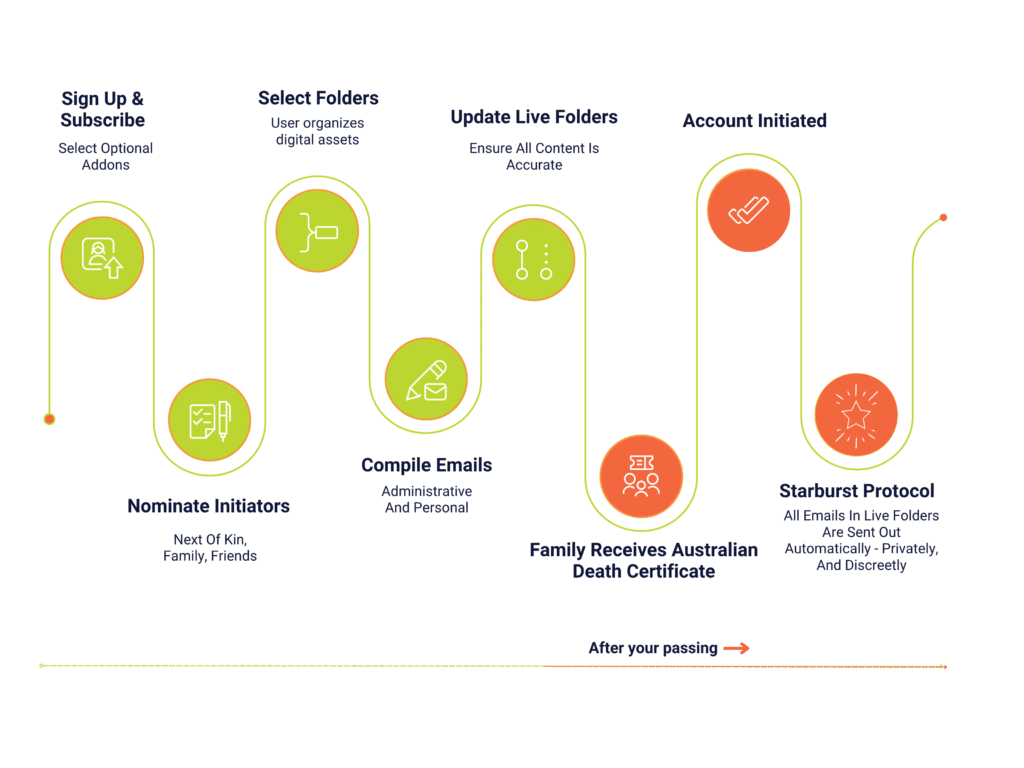
How WIDI activates
simple, private, verified

HOW IT WORKS

FEATURES

Emails — Private & Discreet

All emails are stored in live folders and get sent out automatically when the account is initiated.

Admin Folders

Organise your affairs, prepare notifications, store PINs, crypto access, and social media information.

Life Montage

Place photos and videos of your life for family and friends. QR codes can be placed on headstones and service books.

Time Delay Emails

Prepare emails to be sent out on specific dates — ideal for anniversaries or other special occasions.

Security

WIDI uses best-practice security protocols, ensuring complete peace of mind.

Choosing your initiator

A WIDI user requires an initiator to enter the Australian Death Certificate Number (DCN) onto the Initiator page, in order for all user’s emails and documents to be ‘starburst’ out to all recipients.

An initiator should be a family member, a close friend or Next of Kin. The initiator takes on the responsibility of entering the DCN as soon as able to do so.

It is important for the WIDI user to understand that the more initiators they have, the greater the chance of having their account actioned sooner rather than later, should another initiator be unable to do so at the time. The initiator only has access to the initiator portal to enter the Australian Death Certificate number and cannot access or see any of your emails. It only requires just one initiator to do this and it doesn’t matter which initiator access the WIDI page first. Once initiated, there is no requirement for any further action by the other initiators.